

Oakland County G2G Transition FAQs
General Transition Questions
How do I reset my Okta password to access my new PayIt applications?
Users can reset their password by going to https://oakgov.okta.com.
For step-by-step instructions, including a video guide, please refer to the help page at https://myappshelp.oakgov.com.
You may also reach out to our Service Center at (248) 858-8812 or via email at ServiceCenter@oaklandcountymi.gov.
Is there a charge for our Agency to use the new Platform?
There is no charge to Agencies for utilizing the new Platform. All merchant fees are covered by the increased Service Fee.
Will customer receipts still show our Agency information for our customers?
Yes. Your Agency Seal or Logo will be shown on receipts that are printed or emailed to your customer after a purchase.
What if a Vector file of our Agency Seal or Logo is unavailable?
If a vector file of your Seal or Logo is not available, please provide a clear PNG or JPG of the image on white background.
For reference, a good base file size for a Seal is 72 pixels for both height and width.
If your Agency does not have a Seal or a Logo, your Agency Name will still show on the receipt.
Will customer statements continue to show 2 separate charges for payments on the new Platform?
No. Customers will see a single transaction for the total purchase price (Product Amount + Service Fee) on their statement.
We have link(s) on our website which allow our customers to make various payments online to our agency. Do we need to update our link(s)?
All current G2G Cloud Solutions Online Payments for your Agency will be converted to the new Platform. We will provide updated URLs for your website payment link(s)ahead of the implementation of your Agency on the new Platform. G2G Cloud Solutions and PayIt representatives will work with your Agency to coordinate the timing of updates on your website.
Will there be any changes to reporting or my scheduled reports?
The new Platform will provide the following reports to your Agency's designated email address(es):
- Daily and Monthly Remittance reports, which will include payment successes and ACH failures.
- Daily chargeback reports.
Disbursement receipts will be provided for each deposit to your bank account.
Ad-hoc transaction searching is also available through ProSight, PayIt's administration application with the ability to export your data to Excel.
User scheduled reports and custom reports will not be available on the new Platform at implementation; however, this is a current roadmap item.
What is the benefit to our customers if they create an account on the new PayIt Platform?
A Digital Government Profile on PayIt's platform allows your customers to:
- Store and manage their payment methods.
- Pay and manage real estate and personal property tax in one place.
- Receive payment reminders.
- Access tax documentation and transaction history anytime.
- Transact across agencies using the PayIt platform.
New Platform Action Items
New merchant accounts must be established by PayIt to deposit funds to your bank account. The following Action Items must be completed before we can transition your Agency to the new Platform.
Merchant Account Setup Steps
A designated representative from your Agency should complete the Merchant Account Information form for each bank account used for G2G Cloud Solutions services.
A link to a Secure Folder for your Agency will be provided by the G2G Cloud Solutions Transition Team. This is a safe link and access is restricted to email addresses receiving the notification. This folder provides a secure way to transfer your Agency's banking information. If your designated representative is unable to access the folder, please email Transition@g2gcloud.com for assistance.
What documents should be uploaded to our Agency's Secure Folder?
W9 for your Agency
Bank Verification Letter. A Bank Verification Letter from your banking institution verifies the bank account is active and in good standing. It should provide full bank account and routing numbers (see example below).
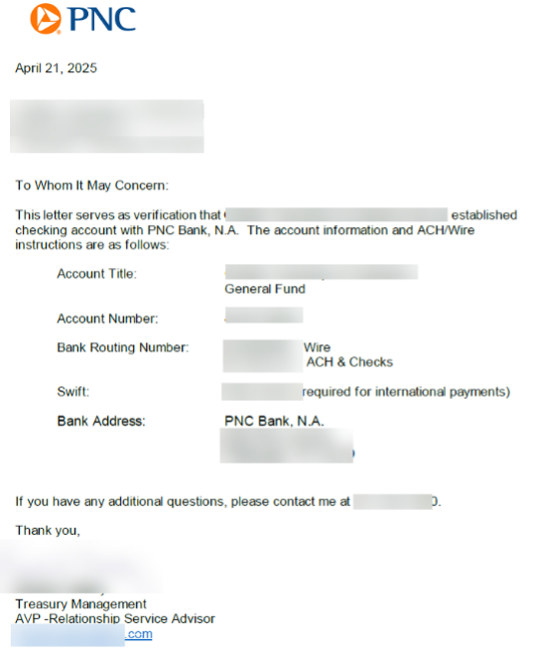
Additionally, you may upload your Agency Logo or Seal to be used on customer receipts. Please provide vector files if possible. Acceptable formats are:
- SVG (Scalable Vector Graphics)
- AI (Adobe Illustrator)
- EPS (Encapsulated PostScript)
- PDF, PNG or JPG on a white background
Is one Bank Verification Letter sufficient to validate multiple accounts?
Yes, if the letter clearly identifies each account's information.
What happens to our current Merchant Accounts once we have Transitioned to the New Platform?
G2G Cloud Solutions Team will close out your current Merchant Accounts with our current vendors once the Transition is complete.
What if we discover we need to refund an Order that was processed under the old Platform?
Once the current Merchant Accounts are closed, refunds will not be able to be processed through myG2G.com. You will need to refund the customer manually with a check.
What is the G2G Platform Transition Questionnaire for?
Our G2G Platform Transition Questionnaire information will help us prepare updated Interlocal Agreements between your Agency and Oakland County.
When does the G2G Platform Transition Questionnaire need to be completed?
Please complete the form by 7/15 2025.
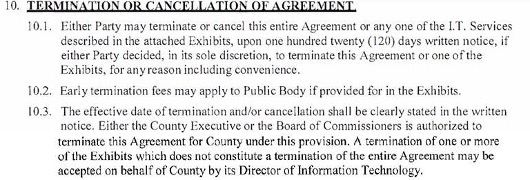
If your Agency will not continue with the Program, please follow the termination steps found in Section 10 or 11 of your Interlocal Agreement (see inset below).
Payment Devices
Will our Agency need to pay for the new Ingenico Payment Devices if we use G2G Cloud Solutions Over-the-Counter service?
No. Oakland County will provide new Ingenico Lane/3600 Payment Devices for its municipalities that use G2G Cloud Solutions Over-the-Counter service for credit card payments.
Why can't we continue to use our current G2G Cloud Solutions card readers on the new Platform?
The current G2G Cloud Solutions card readers are specifically configured for the current merchant services provider (Elavon).
New Merchant Services providers are being used with the new Platform.
The new Ingenico Payment Devices are integrated with the new Platform Merchant Services.
Additionally, the new Ingenico Payment Devices provide for enhanced customer security and modern payment options requested by many of our Agencies.
What should we do with the current G2G Cloud Solutions card readers once we have transitioned to the new Platform and the Ingenico payment devices?
Your current G2G Cloud Solutions card readers will be deactivated by our current provider. You may dispose of the card readers in the same manner that you dispose of other computer and electronic equipment at your Agency.
We recommend using an appropriate recycling service.
What payment options are available with the new Ingenico Payment Devices?
The new Ingenico Payment Devices allow for Chip, Tap, and Swipe, as well as eWallet services such as ApplePay and GooglePay for payment at the counter.
Will we be able to process phone payments using the new Ingenico Payment Devices?
No. The new Ingenico Payment Devices do not process payments without a credit or debit card, or a mobile device equipped with eWallet being present.
If customers are not able to make payments in person, we recommend having an Online Payment web page created for your Agency where you can direct your customer's to complete a payment online.
Online Payments is a service provided by G2G Cloud Solutions. Please contact Transition@g2gcloud.com for more information.
When will we receive the new Ingenico Payment Devices?
New Ingenico Payment Devices will be delivered approximately 2 weeks ahead of the implementation of your Agency on the new Platform, along with detailed setup instructions. Training will be provided, if necessary, to assist with the process.
What should I do if the device's activation code doesn't appear?
If the activation code doesn't appear on the screen, it may be due to a network issue. To check and adjust the network settings:
- On the device, press 0001 to open the Admin Menu.
-
Press 2 for Ethernet Options.
- Use the yellow < button to go back if needed.
- If you're using a static IP, press 1 for IP Configuration.
- On the Ethernet Configuration screen:
- The device uses DHCP by default.
- To switch to Static IP, press the green O to turn off DHCP.
- Use the arrow keys to update the IP, subnet, and gateway settings.
- Press the green O to enter and edit each setting.
- After entering all details, press the yellow < to go back.
- When prompted, press the green O to save the settings or the red X to cancel.
Once the correct network settings are applied, the activation code should appear. If it still doesn't, check your network connection or contact support.
Do the readers plug directly into our network via Ethernet, or is an intermediary device (like a USB-to-Ethernet adapter) required?
The readers have an RJ45 port and plug directly into the Ethernet jack in the wall. No intermediary device is needed.
What if I can't reach my Ethernet jack?
If the Ethernet jack is out of reach, we recommend using a standard network extension cable or barrel connector.
We'd like to assign the devices static IP addresses. Is it possible to change the IP settings manually?
Yes, see What should I do if the device's activation code doesn't appear? above.
We can open the setup menu, but can't change anything. How do we access and modify these settings?
What should I do if the device's activation code doesn't appear? above.
The documentation mentions USB, Ethernet, and HDMI ports. Which connections are actually required?
Your official onboarding guide requires only Ethernet and power connections. You can disregard other ports or references from additional materials that may have come with the device.Do the readers plug into a USB port on a computer?
The Ingenico payment device is intended to be connected directly to an Ethernet jack on your network. They cannot be connected via USB.
Pay Local Tax Program
Will the Current Tax application on the new Platform continue to update BS&A when customer's make tax payments?
Yes. Both the new Property Tax application and Property Tax Hotline will update the Oakland County BS&A tax database when payments are processed on the new Platform.
When will taxpayers be able to make payments?
The Current Tax Application will be available to accept payments on July 1st for 2025 Summer and Village tax bills.
2025 Winter tax bills can be paid beginning December 1st.
Can taxpayers schedule their tax payment for a future date?
The Current Tax Application will allow taxpayers to schedule a credit and debit card payment for a future date up to and including the due date.
Depending on your municipality's payment rules, the Current Tax Application will allow taxpayers to schedule an ACH payment for a future date up to 5 calendar days before the due date.
Will the URL for the new Property Tax application be different from the current URL?
The current URL will redirect users to the new URL so you will not have to update your tax bills for the 2025 tax season.
The new URL will be provided for the 2026 tax season for printing on your tax bills.
Will the phone number for the new Property Tax Hotline be different from the current phone number?
No. The same phone numbers will direct callers to the new Property Tax Hotline.
Will the Property Tax Hotline on the new Platform accept both Credit Card and ACH payments by phone?
The new Property Tax Hotline will only accept Credit or Debit Card payments on the new Platform.
ACH payments using a bank account and routing number are accepted through the new online Property Tax application if your Agency has opted to accept ACH payments.
Will the Property Tax Hotline on the new Platform provide historical payment information by phone?
The new Property Tax Hotline will not provide historical payment information.
Historical payment information can be seen on the new online Property Tax application.
Will taxpayers for non-participating municipalities be able to hear their tax bill amounts on the Property Tax Hotline?
The new Property Tax Hotline will not provide tax payment information for municipalities that do not participate in the Pay Local Tax Program. Callers will be directed to contact their local municipality treasurer's office for their tax information.
Revenue Sharing
How is Revenue Sharing Changing?
Revenue Sharing of the Service Fee will end December 31, 2025.
Final disbursements will be issued on or before January 31, 2026.
Why is Revenue Sharing Changing?
Due to increased costs of merchant services fees associated with the new Platform, Oakland County will not have net Service Fee revenue to share with G2G Cloud Solution and Pay Local Tax Participating Agencies.
Service Fees
How are Service Fees Changing?
Beginning July 1, 2025, our current Service Fee incremented schedule will be replaced.
A flat 3.5% Service Fee will be calculated on the total purchase paid by the customer when a credit or debit card is used for payment.
A $2.50 Service Fee will be calculated on the total purchase paid by the customer when ACH (electronic check) is used for payment (if ACH payments are enabled for your Agency). This fee did not change.
Merchant services fees will continue to be paid by Oakland County as part of the G2G Cloud Solutions offering. The change to our Service Fees will cover the increase in merchant services fees paid by Oakland County.